Food · Consumer · Live · 8 min read
HalalCodeCheck
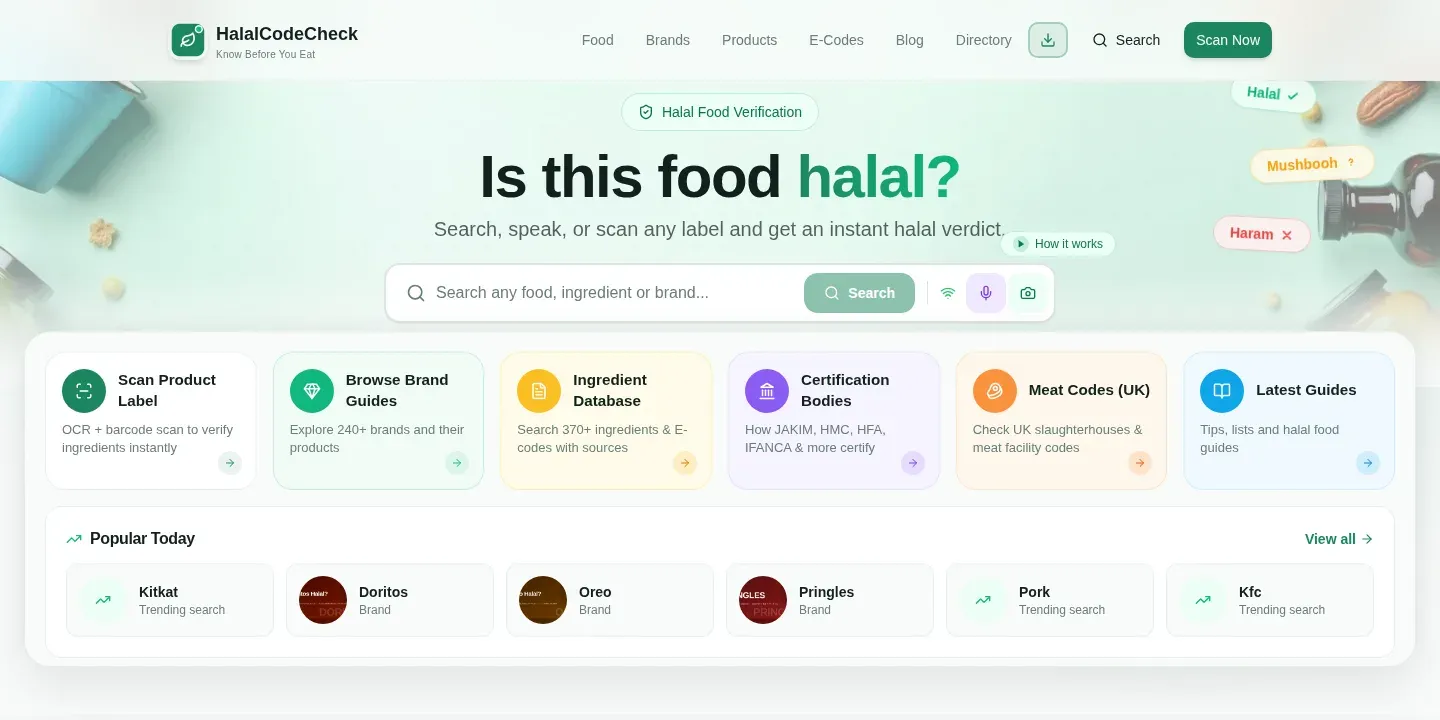
A privacy-first app that tells shoppers whether the additives on a food label are halal
- Live product
- Visit product
- Product team
- LucidReactor Labs
- Our contribution
- Product design
- On-device OCR
- Voice input
- Data curation
- Analytics
- Feedback system
- Technologies used
- React
- TypeScript
- Tesseract.js
- Web Speech API
- Supabase
- Cloudflare Pages
- Vite
The Challenge
Muslim shoppers often need to know if a food is halal. The hard part is the additives. Labels list them as E-codes, in very small print. There are hundreds of these codes, and scholars do not agree on all of them.
To check one product, a shopper must read the label, understand the E-code system, and find a source they trust. They must often do this in a busy shop, with a product in one hand.
Early research gave us three clear requirements:
- Speed: a check must take 30–90 seconds, the time a shopper will spend in an aisle.
- Accuracy: label reading (OCR) must find more than 85% of the E-codes on a label.
- Privacy: users did not want to upload photos of their food to a cloud server.
Our Role
LucidReactor Labs designed, built and runs HalalCodeCheck from end to end. Our work covered:
- Product design and mobile-first UX for in-store use
- On-device OCR that reads E-codes from a photo of the label
- Hands-free voice input
- Research and curation of a database of 360+ E-codes
- Performance work on bundle size, image size and load time
- Section-level analytics and a feedback system with abuse controls
- Deployment on Cloudflare Pages
What We Built
Three ways to check a label
Shoppers are in different situations, so the app offers three inputs:
- Scan: take a photo of the label. The app reads the E-codes with OCR.
- Voice: say the code (“E100”, “100” or “one hundred”). This works when the shopper’s hands are busy.
- Search: type a code that the shopper already knows.
OCR that stays on the device
All label reading runs in the browser with Tesseract.js. Images and OCR text never leave the phone. This removed the privacy concern and also removed server costs for OCR.
A single OCR pass was not good enough. It missed codes on busy backgrounds, read “O” as “0” and “I” as “1”, and took 80–240 seconds. We built a multi-pass approach. The app tries up to six combinations of image preparation and recognition. It scores each result by the number of E-codes found and their confidence. When it finds three or more codes with good confidence, it stops early. This happens in about 80% of scans, which then finish in 30–60 seconds.
Voice input
Voice uses the browser’s built-in Web Speech API, with no outside service. The app turns different spoken forms into one standard E-code format. It also handles failure clearly:
- Microphone permission denied → the app switches to manual input and explains why.
- Device offline → the app detects this and asks the user to reconnect.
- Speech not understood → the user sees what the app heard, and can try again or switch method.
Testing showed voice input was 2–3× faster than typing in a shop.
A curated E-code database
The database holds 360+ E-codes: about 200+ halal, about 10 haram, and about 150+ doubtful (mushbooh). Some codes are simple; E621 (MSG) is widely accepted as halal. Others, such as E120 (carmine), divide opinion between schools of Islamic law. Each entry is checked against several trusted sources, and we record the reasons for non-obvious decisions. This is domain research, not only engineering.
Onboarding and trust
Many visitors did not know what E-codes are. We rewrote the homepage for first-time users. It now explains what the app checks, when to use it, and how it helps before a purchase. We added a section that explains how answers are reached and where the data comes from. We also made the next step after each result clear, instead of stopping at a status label.
Analytics and a feedback loop
We added event tracking to each section of each page, so we can see where users engage and where they leave. Users can rate a result and leave a comment on results pages, E-code pages and food category pages. Feedback is stored in Supabase, so we can search and group it.
To keep the feedback useful, the backend has server-side controls:
- Cooldown and rate limits
- Daily submission limits
- Duplicate detection with a hash of the comment
- Basic spam and link checks
Performance
- Images: phone photos of 2–5 MB are compressed in the browser to 200–500 KB, with no loss in OCR accuracy.
- Code: the main bundle went from 677 KB to about 200 KB. We split the code and load Tesseract.js only when a user starts a scan.
How It Evolved
We released early and improved the product in steps, based on user feedback and measured problems:
- V1: single-pass OCR and manual search.
- V2: multi-pass OCR and better image preparation.
- V3: voice input and checking many codes from one label.
- V4: performance: code splitting, image compression and early exit.
- V5: onboarding for new users, trust content, section analytics and stored feedback.
The visual design went through four rounds in parallel: clear halal / haram / doubtful colours, type that is easy to read on small screens, large touch targets, and contrast that works in bright light.
The Result
| Metric | Before | After |
|---|---|---|
| Main bundle size | 677 KB | ~200 KB (70% smaller) |
| Image size for OCR | 2–5 MB | 200–500 KB (85–90% smaller) |
| Time to interactive (mobile) | 4–6 s | 1.5–2 s (65% faster) |
| Lighthouse score | Baseline | +6 to +12 points |
- A shopper can check a label in 30–90 seconds, by scan, voice or search.
- Core features work without a server: OCR and lookups run on the device.
- Section analytics and stored feedback now show the team where to improve next, so each release targets a real problem.
Key Takeaways
Privacy can be an architecture decision. Running OCR on the device solved the privacy concern without asking users to trust a server.
Speed comes from many small fixes. Compression, code splitting, early exit and lazy loading each helped. No single change was enough.
Real context decides features. Voice input was not an extra. Testing in shops showed it was much faster than typing.
Data quality needs ongoing work. The E-code database needs regular research and clear sources.
Measure, then improve. Analytics plus stored feedback give a reliable way to choose the next change.
Questions
Frequently asked
What does HalalCodeCheck do?
It tells shoppers whether the additives (E-codes) on a food label are halal, haram or doubtful. People scan the label, say the code or type it, and get an answer with sources in 30 to 90 seconds.
Do photos of food labels leave the phone?
No. Label reading runs in the browser with Tesseract.js. Images and the recognised text never leave the device, and there is no OCR server.
How many E-codes does the database cover?
More than 360 E-codes. Each entry is checked against several trusted sources, and the reasons for non-obvious decisions are recorded.
What did LucidReactor Labs build?
The product design, on-device OCR, voice input, the curated E-code database, performance work, section-level analytics and a stored feedback system. LucidReactor Labs designed and built HalalCodeCheck end to end.
Want something like this built?
We design and build focused software, from idea to launch. Tell us about your project.